

Problem authenticating with Panopto
Hi,
I'm having a lot of trouble with the api, I'm in the first step and it's impossible to get a token.
I read the doc, and I use this :
To get a token for a User-Based Server Application client, make a POST request to the Panopto OAuth2 token endpoint: https://<server>/Panopto/oauth2/connect/token
I'm getting the next error: "invalid_client". I tested a lot of things as:
Auth URL: https://<server>/Panopto/oauth2/connect/token
Clientid: <clientid generated in Panopto>
Clientsecret: <client secret generated in Panopto>

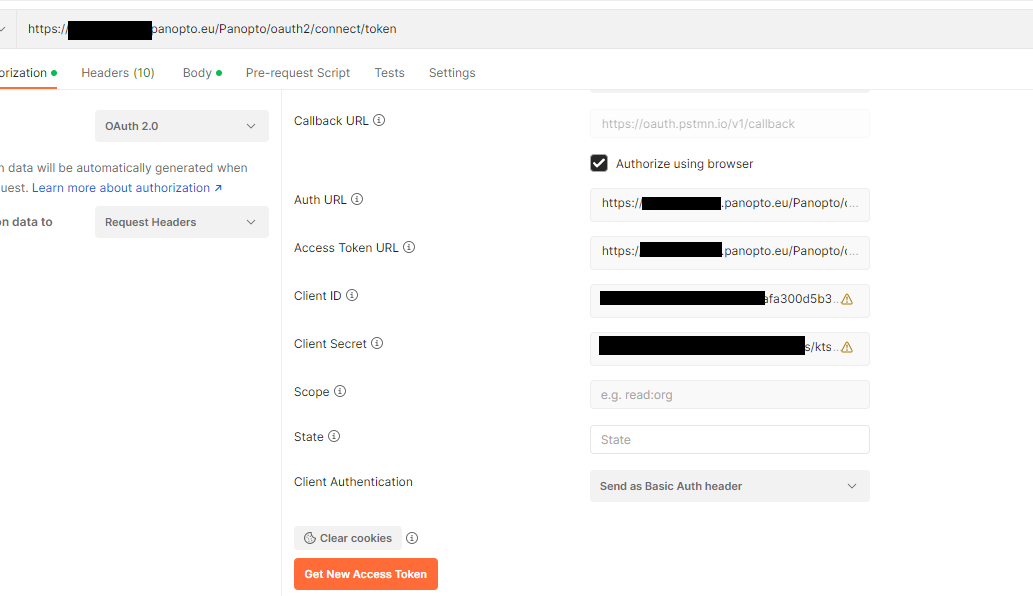

Some idea? I just confused and I don't know what else to try
I tried too by adding in body as "x-www-form-urlencoded"
Thanks in advanced
Best Answer
-
 Jose Mar
Tyro
Jose Mar
Tyro
Good morning
I finally got it to work. I have created the application as "User Based Server Application". In this way and with the following code that I attach below, the authentication can be done correctly and I receive the token.
This process will be executed automatically (by a cron), therefore security is not a problem for me, since the credentials are also configured in a configuration screen to which users do not have access.

I hope it can help someone, thanks to @Vegard Wallin for having tried to help me
Regards
0

Answers
I've double checked that the client ID is ok, the client secret is ok too, the return url is ok (without typos errors).
I'm a bit desperate because I don't see the error and I'm starting to think that it could be a problem with the environment... Is this possible?
Regards
Reading this post (https://community.panopto.com/discussion/1208/rest-api-authentication-issue), I see that it mentions that you have to indicate the instance\username...
They created a user for me and they only gave me the username, which is an email... Could that be the cause?
Regards
Hi.
I had a working Postman set up to get an access token using the 'Server based user application' API client, but I switched to the 'JavaScript Web Application' one so I don't need to store or fill in a password to Postman. Below I show my setup which is working fine. The {{prod_implicit_clientId}} variable holds the API Client ID (secret not necessary). In the API client settings, I've entered https://oauth.pstmn.io/v1/browser-callback as an allowed Redirect URL.
When asking for a new access token, Postman will pop up the Panopto login page for authorization, and when successful ask if I want to store the token (which is valid for 3600 seconds I believe).
Hope it helps!
Hi @Vegard Wallin
First of all thank you very much for the answer.
I've tried by replicating your settings but I keep getting an error while authenticating and I can't authorize myself. The error is the same that I am getting is still the same.
Again, thank you very much for the answer, I keep investigating to see if I can find out what is happening
Regards
Hi.
I notice that the Callback URL in Postman is different from the redirect URL set up in the Panopto API client setup. If I replicate this I get the same error as you. As soon as I made them the same, it works.
Hi @Vegard Wallin many thanks!!
Now I can do some tests. I want to work in a server application, but for the first tests I can work with this.
Really thanks, I was stuck and can't advance
Regards
Hi all, I still stuck with the authentication.
It's working by using as JS, but I need login as WebServer Application... Any suggestion?
Thanks in advance!